
BiteRight for business
Food logging and nutrition data for health organisations.
Know what your patients, clients or study participants eat between visits, and hear about it when a day goes past a limit. People log meals by photo, voice or text, BiteRight returns the foods with nutrient estimates, and your team sets the sugar, carb, fat or protein limits.
The nutrition API is available to approved partners. Sandbox access is available on request.
Need a workspace to review patients’ meal records? Explore the dietitian portal.
Prepare your demo request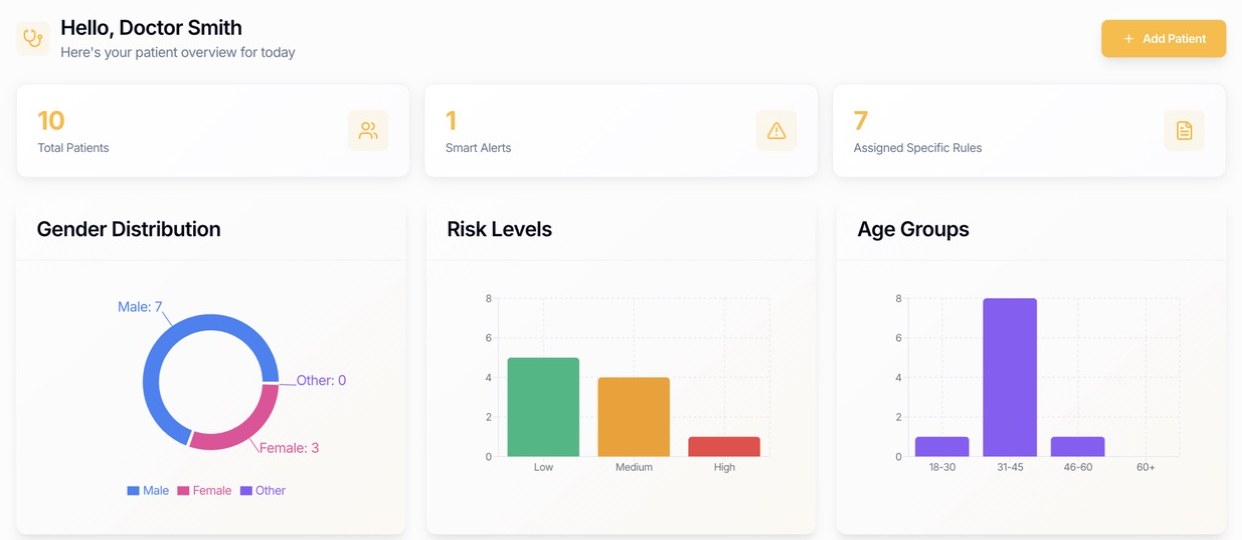
BiteRight at a glance
Meal inputs
Photos, voice notes or text, in English or Arabic through the API. The app is in English, French, Arabic and Spanish.
Outputs
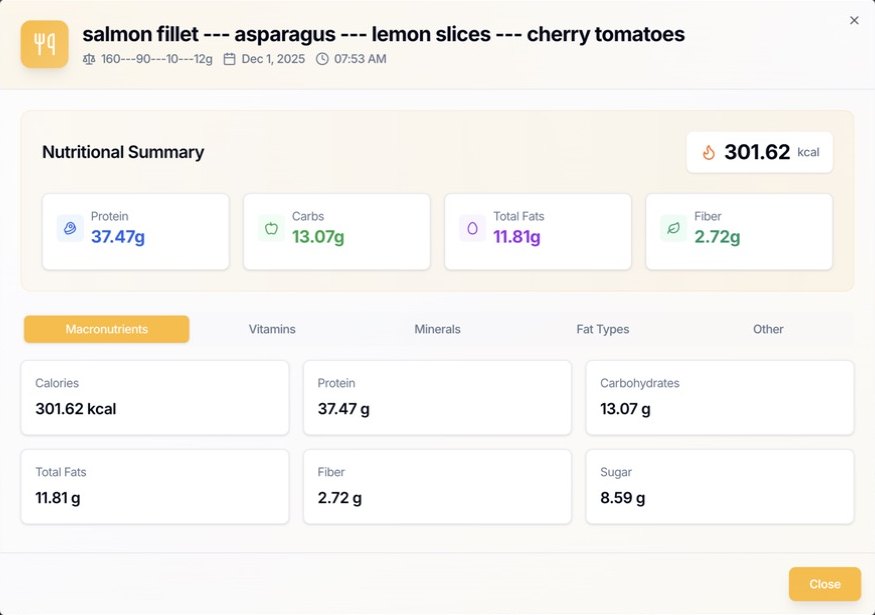
Recognised dish, estimated weight, ingredients, calories, macronutrients, vitamins and minerals.
Limits and alerts
Daily maximums for sugar, carbs and fat and a daily protein minimum, set by your organisation, a clinician or the user.
Two ways to use it
The nutrition API inside your own app, or the dietitian portal to review and export meal logs.
Hosting
Oracle Cloud, regional hosting, encryption in transit and at rest, and a DPA.
Use cases
Who uses BiteRight?
Pick your industry to see how BiteRight would work there.
Hospitals and health systems
Spot diet problems between appointments instead of at the next visit. Patients log meals in your own app, and the care team is alerted when a day goes past a limit.
Clinics and dietitian practices
Spend consultations on advice instead of food recall. Clients log meals by photo or voice, and you see which days broke their limits.
Clinical trials and research
Make food diaries easier to keep and quicker to analyse. Each photo or voice note becomes nutrient data you can export.
Digital health and GLP-1 programmes
Help members stay within their daily sugar, carb or fat limits, with photo logging and an alert when a day goes over. For diabetes, IBS, weight or GLP-1 apps.
Gyms, fitness and coaching apps
Help members hit their daily protein target, with meal logging as quick as a photo or a voice note.
Wearables and connected devices
Show users how what they eat relates to their activity, sleep or glucose, by adding meal data from a photo or voice note to your companion app.
Longevity and preventive health clinics
See how a client's diet changes over months and act early. Protein, fibre, sugar and micronutrients, tracked over time and reviewed by your clinicians.
Insurers and employee wellness
Bring healthy-eating support to members in English or Arabic, inside the wellness app they already use.
- Oracle Cloud Infrastructure
- Regional hosting
- Encrypted in transit and at rest
- DPA for business customers
- Arabic and English input
- 2.5M+ food records
Examples on these pages use fictional organisations. The security page covers hosting, encryption and the DPA.
Inside your app
Your interface stays yours.
A hospital or health app keeps its own screens, branding and flows. The BiteRight API works behind them: your app sends the meal, and food and nutrient estimates come back for you to show your way.
Your plan
Daily sugar limit: 30 g
Set by your care team · example value
Logged before lunch: 27 g

Lunch
Logged with a photo
Spinach pie, 1 slice
- Carbs
- 24 g
- Protein
- 11 g
- Sugar
- 6 g
Today's sugar is above the limit your care team set.
Behind the scenes
BiteRight API
Receives the meal, returns food and nutrient estimates, and flags when the day crosses a limit your organisation set.
5. The day crosses the limit, so your app alerts
Limits and alerts your team sets
Your organisation, your clinicians or the user can set daily limits, and BiteRight flags each day that crosses one. In the dietitian portal, clinicians set rules per patient and review the flagged meals. Clinical targets should be agreed with a qualified clinician; BiteRight does not set treatment targets or diagnose conditions. How limits and alerts work.
Daily maximums
Set a daily maximum for sugar, carbohydrate or fat for each user or programme.
Daily minimum
Set a daily protein minimum, useful for recovery, GLP-1 support or strength programmes.
Alerts in your app
When a day crosses a limit, the user gets an alert, shown in your app's own design.
Start with one meal and the data you need from it.
Take one meal description and decide which foods, portion estimates and nutrients your product needs to show or review.
A meal to discuss
“Salmon with quinoa, broccoli, avocado and sweet potato.”
- Food recognition
- Which dish and ingredients are suggested? How will a person correct a mismatch?
- Portion estimates
- How is the quantity represented, and what happens when the portion is unclear?
- Nutrition information
- Which nutrients and units does your workflow need? How should missing values appear?
Example fields, placeholder values
Field names come from earlier sandbox examples. This shortened record is an illustration. It is not a live analysis or the current API specification.
{
  "recognized_dish": "[dish estimate]",
  "total_weight": "[weight estimate]",
  "calories": {
    "name": "Calories",
    "amount": "[estimate]",
    "unit": "kcal"
  },
  "ingredients": [
    "[recognised ingredient]"
  ]
}
Confirm the current response fields, types, units and error behaviour with the team before building against them.
Nutrient values you can trace to a source.
More than 2.5 million food records (BiteRight-reported) from national databases including AUSNUT, USDA FoodData Central, ANSES-Ciqual, CoFID and the Canadian Nutrient File, with custom-dish interpretation on top.
POST /api/b2b/v1/food-log
POST /api/b2b/v1/food-log-voice
Bearer authentication, multipart uploads and a JSON food log with the recognised dish, estimated weight, ingredients and nutrient amounts. Available to approved partners, with sandbox access on request.
See the API structure and food sourcesComparing options? See voice food logging and nutrition API alternatives.
How photo, voice and text recognition works Developer guides Arabic and Middle Eastern food support Compare nutrition API alternativesHow an evaluation works.
Three steps take you from a first brief to an agreed test. Everything below is to be confirmed with the team. None of it is a published price, usage allowance or certification.
Share your brief
A few details help the team discuss fit, scope and commercial requirements. Start with synthetic or nonpersonal examples.
- Your product and audience
- What are you building, who will use it, and which decision should nutrition information support?
- Meal inputs and coverage
- Photo, voice or text; the cuisines and languages you need; and whether users can review or correct their meal logs.
- Approximate volume
- An estimate of meal submissions per day or month, with a separate view of evaluation use and a possible rollout. An initial estimate is enough.
- Outputs and review
- The nutrients, units and information your product needs, plus any professional review or acceptance criteria.
- Data and deployment requirements
- The hosting, retention, access and privacy requirements your organisation needs the team to assess. Describe the requirement without sending personal records.
- Timing and support
- Your target decision date, integration constraints, procurement steps and the support your team expects.
Discuss scope and pricingShare the details you know in your message. Pricing, limits, support and any evaluation access must be confirmed with the team.
Confirm availability and fit
Ask the team to confirm supported capabilities, the current specification, setup prerequisites and whether an evaluation is available for your use case.
Developers can request sandbox access to test the API. An enquiry does not reserve a delivery date or commit either team to a pilot.
Agree what the evaluation must show
If there is a fit, agree acceptance criteria, access, responsibilities, timing and commercial terms before testing or planning a rollout.
- Access and prerequisites
- Confirm the approved testing environment, specification, access arrangements and any account or profile setup required for the inputs you need.
- Acceptance criteria
- Choose representative meals and reference values. Agree acceptable recognition and portion errors, missing-value handling and when a person should review an estimate.
- Failure behaviour
- Ask how unsupported files, unclear meals, expired access and unavailable services are reported. Confirm limits and retry guidance before integration.
- Data use and security
- Agree permitted use, retention, deletion, access controls, hosting requirements and any rights to store or redistribute results. Request supporting evidence.
- Intended use
- Define how estimates support the workflow and who reviews them. Clinical suitability requires your own assessment; this page claims no clinical validation or compliance certification.
- Commercial scope
- Confirm pricing, usage measurement, any allowances or overages, support responsibilities, evaluation end conditions and the decision needed for a possible rollout.
Questions before you integrate.
Discuss an API demo for your product.
Share your product, meal inputs, expected volume and required outputs. The team confirms the demo format, sandbox availability and evaluation setup. An enquiry does not activate access or book a meeting.
Need to prepare your requirements? Use the evaluation brief.
Looking for personal food tracking? Explore the BiteRight app.